
Getting Started#
This guide covers the core Factoriax workflow: observations, actions, and running efficient rollouts with JAX.
Prerequisites: install the package with uv sync (or pip install factoriax).
Introduction#
Factoriax is a JAX-native reinforcement-learning environment inspired by Factorio. The goal is to automate production lines and ultimately launch a rocket, starting from raw ore and progressing through smelting, assembly, and science research.
The environment follows the gymnax API.
A stateless env object and an EnvParams struct hold all configuration.
env.reset_env and env.step_env take explicit JAX keys and states and are
fully JIT-compilable and jax.vmap-able.
import jax
import jax.numpy as jnp
import numpy as np
import matplotlib.pyplot as plt

from factoriax.make import env_from_name

env, params = env_from_name("EasyRocket-v1")
obs, state = env.reset_env(jax.random.PRNGKey(0), params)
from factoriax.engine.renderer import JaxRenderer
from pathlib import Path

_IMG_DIR = Path("_images")
_IMG_DIR.mkdir(exist_ok=True)

fig, ax = plt.subplots(figsize=(4, 4))
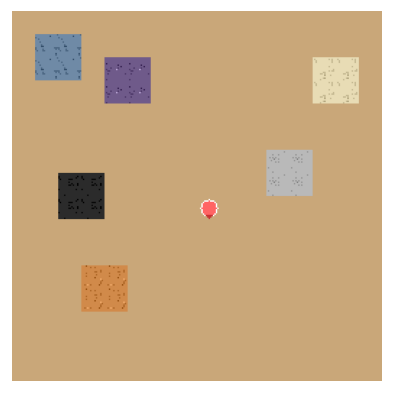
ax.imshow(np.asarray(JaxRenderer(tile_px=16).jit_render_map(state)))
ax.axis("off")
fig.savefig(_IMG_DIR / "getting_started_state.png", bbox_inches="tight", dpi=120)
plt.close(fig)
Observation space#
Factoriax supports two types of observation: vector and image.
Vector observations are flat float32 arrays in [0, 1] returned by reset_env and step_env. Four variants are available:
Variant |
View |
Shape |
|---|---|---|
|
whole map |
|
|
|
|
|
whole map |
|
|
|
|
Pass obs= to env_from_name to select a variant. Use obs_radius= to set the window half-width for local variants.
Image observations are RGB arrays from factoriax.engine.observations.rgb. They are not JIT-compatible.
for obs_name in [
    "x_ray_global",
    "x_ray_local",
    "superficial_global",
    "superficial_local",
]:
    e, p = env_from_name("EasyRocket-v1", obs=obs_name, obs_radius=5)
    print(f"{obs_name:25s}  {e.observation_space(p).shape}")
from factoriax.engine.observations import rgb

img_obs = rgb(state, block_pixel_size=32)
print("shape:", img_obs.shape, "  dtype:", img_obs.dtype)

plt.figure(figsize=(4, 4))
plt.imshow(img_obs)
plt.axis("off")
plt.show()
Action space#
Actions are flat integers. The space has 85 actions split into five families:
Family |
Offsets |
Count |
Actions |
|---|---|---|---|
Move / face |
0 – 8 |
9 |
|
Interact |
9 – 16 |
8 |
|
Place |
17 – 26 |
10 |
|
Craft |
27 – 52 |
26 |
|
Deposit |
53 – 84 |
32 |
|
Each action is self-contained: placement names the machine, deposit names the item, so no slot cursor is needed. Invalid actions (e.g. placing on water) are silently ignored.
from factoriax.engine.constants import (
    Action,
    MoveAction,
    InteractAction,
    NUM_ACTIONS,
    PLACE_BASE,
    CRAFT_BASE,
    DEPOSIT_BASE,
    PLACEMENT_ITEMS,
    CRAFT_ITEMS,
    DEPOSIT_ITEMS,
)

print(f"Total actions : {NUM_ACTIONS}")
print(f"Move          : 0 – {len(MoveAction) - 1}  ({len(MoveAction)} actions)")
print(
    f"Interact      : {len(MoveAction)} – {PLACE_BASE - 1}  ({len(InteractAction)} actions)"
)
print(
    f"Place         : {PLACE_BASE} – {CRAFT_BASE - 1}  ({len(PLACEMENT_ITEMS)} actions)"
)
print(
    f"Craft         : {CRAFT_BASE} – {DEPOSIT_BASE - 1}  ({len(CRAFT_ITEMS)} actions)"
)
print(
    f"Deposit       : {DEPOSIT_BASE} – {NUM_ACTIONS - 1}  ({len(DEPOSIT_ITEMS)} actions)"
)
print()
print("Place actions:", [a.name for a in Action if a.name.startswith("PLACE_")])
Running rollouts#
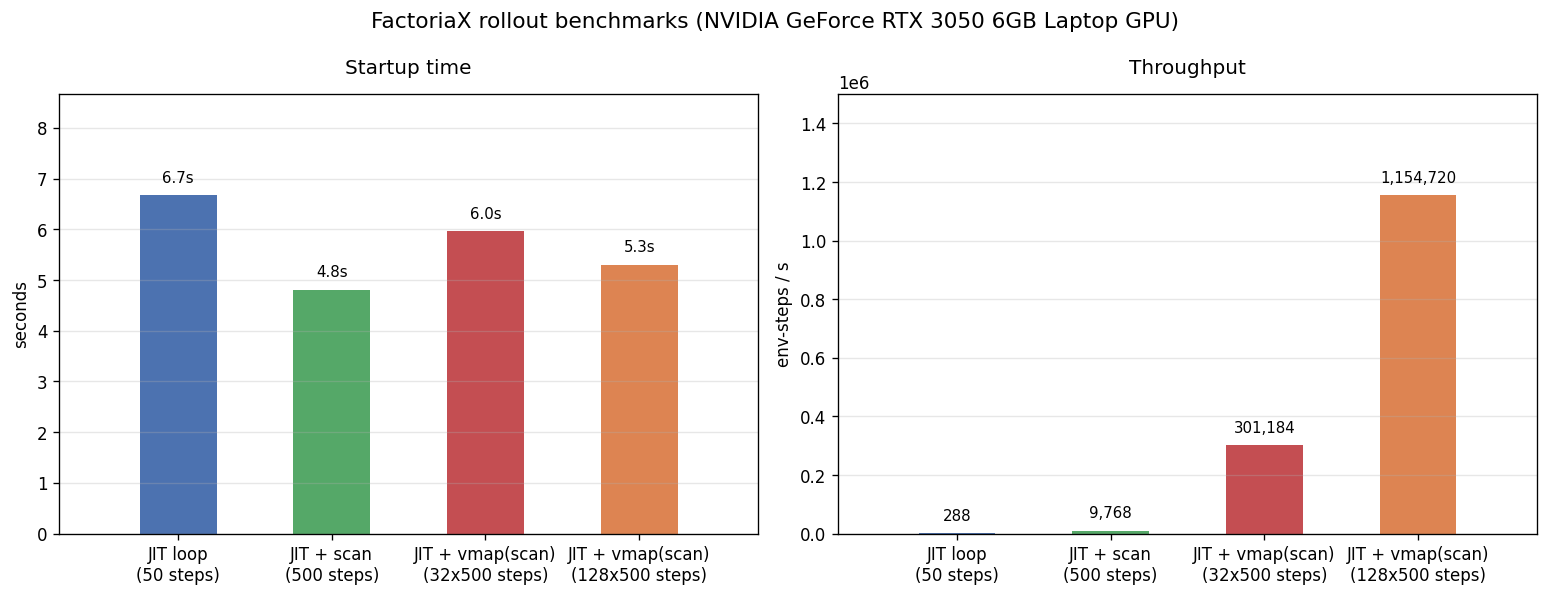
The recommended setup for training is jax.jit(jax.vmap(rollout)): one compiled XLA kernel runs N environments in parallel for T steps, called once per batch from Python.
The rest of this section builds up to that pattern one step at a time.
The full pattern#
import time
from factoriax.engine.constants import Action

NOOP = int(Action.NOOP)
N_ENVS = 32
N_STEPS = 500
N_REPS = 3


def scan_body(carry, _):
    key, state = carry
    key, sk = jax.random.split(key)
    _, state, reward, _, _ = env.step_env(sk, state, NOOP, params)
    return (key, state), reward


def rollout(key):
    _, state = env.reset_env(key, params)
    (_, state), rewards = jax.lax.scan(scan_body, (key, state), None, length=N_STEPS)
    return rewards


collect = jax.jit(jax.vmap(rollout))
Building it up#
Each step adds one layer. JIT is always on.
1. JIT only#
jax.jit(step_env) compiles the step function once. Python still drives the loop, so throughput is bounded by the host dispatch rate.
LOOP_STEPS = 50

step_jit = jax.jit(env.step_env)


def run_loop(key):
    _, state = env.reset_env(key, params)
    for _ in range(LOOP_STEPS):
        key, sk = jax.random.split(key)
        _, state, _, _, _ = step_jit(sk, state, NOOP, params)
    jax.block_until_ready(state.player_inventory)


t0 = time.perf_counter()
run_loop(jax.random.PRNGKey(0))
loop_startup = time.perf_counter() - t0

t0 = time.perf_counter()
for i in range(1, N_REPS + 1):
    run_loop(jax.random.PRNGKey(i))
loop_steady = (time.perf_counter() - t0) / N_REPS
loop_sps = LOOP_STEPS / loop_steady

print(
    f"startup {loop_startup:.1f}s   steady {loop_steady:.3f}s   {loop_sps:,.0f} steps/s"
)
2. Replace the loop with lax.scan#
jax.lax.scan compiles the full T-step rollout into one XLA program. Python makes one call per episode. No per-step dispatch overhead.
run_scan = jax.jit(rollout)

t0 = time.perf_counter()
jax.block_until_ready(run_scan(jax.random.PRNGKey(0)))
scan_startup = time.perf_counter() - t0

t0 = time.perf_counter()
for i in range(1, N_REPS + 1):
    jax.block_until_ready(run_scan(jax.random.PRNGKey(i)))
scan_steady = (time.perf_counter() - t0) / N_REPS
scan_sps = N_STEPS / scan_steady

print(
    f"startup {scan_startup:.1f}s   steady {scan_steady:.3f}s   {scan_sps:,.0f} steps/s"
)
3. Vectorise across environments with vmap#
jax.vmap(rollout) maps the scan over N independent keys in one kernel call. collect is the function defined in the full pattern above.
collect_32 = jax.jit(jax.vmap(rollout))
collect_128 = jax.jit(jax.vmap(rollout))

for n, col, label in [(N_ENVS, collect_32, "32 envs"), (128, collect_128, "128 envs")]:
    keys = jax.random.split(jax.random.PRNGKey(0), n)
    t0 = time.perf_counter()
    jax.block_until_ready(col(keys))
    startup = time.perf_counter() - t0

    t0 = time.perf_counter()
    for i in range(1, N_REPS + 1):
        jax.block_until_ready(col(jax.random.split(jax.random.PRNGKey(i * 100), n)))
    steady = (time.perf_counter() - t0) / N_REPS
    sps = N_STEPS * n / steady

    if n == N_ENVS:
        vmap_startup, vmap_sps = startup, sps
    else:
        vmap_startup_128, vmap_sps_128 = startup, sps

    print(
        f"vmap(scan) {label:10s}  startup {startup:.1f}s   steady {steady:.3f}s   {sps:,.0f} steps/s"
    )
import subprocess

try:
    _gpu = (
        subprocess.check_output(
            ["nvidia-smi", "--query-gpu=name", "--format=csv,noheader"],
            text=True,
            stderr=subprocess.DEVNULL,
        )
        .strip()
        .split("\n")[0]
        .strip()
    )
except Exception:
    _gpu = jax.devices()[0].platform.upper()

labels = [
    f"JIT loop\n({LOOP_STEPS} steps)",
    f"JIT + scan\n({N_STEPS} steps)",
    f"JIT + vmap(scan)\n({N_ENVS}x{N_STEPS} steps)",
    f"JIT + vmap(scan)\n(128x{N_STEPS} steps)",
]
startups = [loop_startup, scan_startup, vmap_startup, vmap_startup_128]
throughputs = [loop_sps, scan_sps, vmap_sps, vmap_sps_128]
colours = ["#4c72b0", "#55a868", "#c44e52", "#dd8452"]

fig, (ax1, ax2) = plt.subplots(1, 2, figsize=(13, 5))

for ax, vals, title, ylabel in [
    (ax1, startups, "Startup time", "seconds"),
    (ax2, throughputs, "Throughput", "env-steps / s"),
]:
    bars = ax.bar(labels, vals, color=colours, width=0.5)
    ax.set_title(title, pad=12)
    ax.set_ylabel(ylabel)
    ax.margins(x=0.15)
    top = max(vals)
    ax.set_ylim(0, top * 1.3)
    ax.grid(axis="y", alpha=0.3)
    for bar, v in zip(bars, vals):
        fmt = f"{v:.1f}s" if ax is ax1 else f"{v:,.0f}"
        ax.text(
            bar.get_x() + bar.get_width() / 2,
            v + top * 0.03,
            fmt,
            ha="center",
            va="bottom",
            fontsize=9,
        )

fig.suptitle(f"Factoriax rollout benchmarks ({_gpu})", fontsize=13)
plt.tight_layout()
fig.savefig(_IMG_DIR / "getting_started_benchmark.png", bbox_inches="tight", dpi=120)
plt.close(fig)
Play a game#
Factoriax ships a pygame-based interactive client for playing the game manually.
python -m factoriax.playground.play
Controls: W/A/S/D to move, Space to mine, E to interact, I to toggle the inventory menu, Escape to pause.
You can also launch it from a notebook cell:
from factoriax.playground.play.main import main

main()
Scenarios#
Two scenarios are built in:
Id |
Map |
Resample |
Notes |
|---|---|---|---|
|
16×16 |
Yes |
Procgen map, 2000-step budget |
|
32×32 |
No |
Fixed map, furnace and assembler pre-placed, hand-craft masked, 8000-step budget |
from factoriax.engine.envs.registry import list_scenarios

for env_id, spec in list_scenarios():
    print(f"{env_id:20s}  resample={spec.resample}")
    print(f"  {spec.description}")
    print()
# auto_reset=True wraps the env in AutoResetWrapper.
# reset_env is called automatically whenever done is True.

env_ar, params_ar = env_from_name("EasyRocket-v1", auto_reset=True)

key, reset_key = jax.random.split(jax.random.PRNGKey(7))
obs_ar, state_ar = env_ar.reset_env(reset_key, params_ar)

key, step_key = jax.random.split(key)
obs_ar, state_ar, reward, done, info = env_ar.step_env(
    step_key, state_ar, int(Action.NOOP), params_ar
)

print("reward:", float(reward), "  done:", bool(done))
Saving replays#
A Trajectory bundles actions and (optionally) full state arrays from an episode.
It saves to a compressed .npz file and round-trips via Trajectory.save and Trajectory.load.
from factoriax.analysis.trajectory import Trajectory

key = jax.random.PRNGKey(42)
_, state_t = env.reset_env(key, params)
step_fn = jax.jit(env.step_env)

actions_list = []
for _ in range(10):
    key, step_key = jax.random.split(key)
    _, state_t, _, _, _ = step_fn(step_key, state_t, int(Action.NOOP), params)
    actions_list.append(int(Action.NOOP))

traj = Trajectory(actions=np.array(actions_list))
print(traj)
import tempfile
from pathlib import Path

tmp = Path(tempfile.mkdtemp()) / "demo_replay.npz"
traj.save(str(tmp))

loaded = Trajectory.load(str(tmp))
print("Loaded:", loaded)
print("Actions match:", np.array_equal(traj.actions, loaded.actions))
Creating visualizations#
compose_frame_with_inventory renders the map and inventory panel side by side.
write_video encodes a list of frames to an MP4 via FFMPEG.
from factoriax.analysis.video import compose_frame_with_inventory, write_video

key = jax.random.PRNGKey(99)
_, state_v = env.reset_env(key, params)
step_fn = jax.jit(env.step_env)

frames = []
for _ in range(30):
    frames.append(compose_frame_with_inventory(state_v, block_pixel_size=16))
    key, step_key = jax.random.split(key)
    _, state_v, _, _, _ = step_fn(step_key, state_v, int(Action.NOOP), params)

print(f"frame shape: {frames[0].shape}  ({len(frames)} frames)")

plt.figure(figsize=(8, 4))
plt.imshow(frames[0])
plt.axis("off")
plt.show()
video_path = Path(tempfile.mkdtemp()) / "demo.mp4"
write_video(video_path, frames, fps=10)
print("Saved:", video_path)